A few years ago, “online learning” meant watching a grainy YouTube lecture and trying to stay awake. Then came the pandemic, and everything changed. Classrooms turned into Zoom rooms, teachers became content creators, and students started learning from apps that felt more like Netflix than school.
What began as a stopgap has now evolved into a global movement. From primary schools running digital lessons to professionals upskilling between work calls, education app development has become the heartbeat of modern learning. They’ve turned rigid syllabuses into personalised experiences, complete with live sessions, quizzes, and even AR-based lessons.
It’s no surprise then that the EdTech market, worth around $251 million in 2024, is on track to hit over $810 million by 2033. That’s not just impressive, it’s proof that learning has gone borderless, and technology is the new blackboard. But how much does it cost to develop education app? Let’s find out

Overview of the Education App Ecosystem
Before we get into understanding how much does it cost to develop education app, let’s get an idea about the education ecosystem. If education were a city, EdTech apps would be its roads, bridges, and public transport, connecting learners to knowledge in ways traditional classrooms never could. Today, the ecosystem of education apps is vast, diverse, and growing faster than ever, thanks to a global appetite for accessible, personalised, and engaging learning experiences.
Key Segments of the EdTech Industry
First, let’s look at the main types of apps shaping this ecosystem, and then understand the cost to make educational app:
- E-learning platforms: Think of Coursera, Udemy, and edX as sprawling digital universities. They offer courses on everything from photography to quantum computing, often taught by top professors or industry experts. For example, a working professional might log into Coursera during lunch breaks to learn data science, turning idle time into productive upskilling.
- Tutoring and live-class apps: Platforms like Byju’s and Vedantu bring the personal touch of a tutor to your screen. Imagine having a mini-classroom on your tablet, where the teacher can answer questions in real time and adjust the pace based on student understanding. For students struggling with math or science, these apps can feel like having a personal mentor 24/7.
- Skill-based learning apps: Apps such as LinkedIn Learning and Skillshare focus on practical, career-oriented skills. Whether it’s mastering Excel shortcuts or learning digital marketing, these apps help learners bridge the gap between theory and real-world application. It’s like having a virtual apprenticeship at your fingertips.
- Language learning apps: Duolingo, Babbel, and similar platforms gamify the tedious task of learning a new language. Bite-sized lessons, streaks, and rewards make practicing Spanish or Japanese feel more like a game than a chore.
- School and classroom management apps: Google Classroom and Seesaw keep traditional schooling organised in the digital world. Assignments, announcements, and grading all happen in one place, ensuring students, teachers, and parents stay connected without relying on paper or in-person meetings.
Market Trends Shaping Education App Development
The way these apps are designed and built is constantly evolving. Some of the most influential trends include:
- Gamification and microlearning: Learning in short, interactive bursts is the new normal. Apps use points, badges, and leaderboards to make studying addictive. Think of it as leveling up in a video game, but your reward is knowledge.
- AI tutors and adaptive learning: AI can personalise learning paths, spotting strengths and weaknesses and adjusting content accordingly. It’s like having a tutor who knows exactly what you need before you even ask.
- AR/VR and immersive learning experiences: Imagine dissecting a virtual frog in biology class without the smell or mess, or walking through ancient Rome in 3D history lessons. AR and VR are turning abstract concepts into experiences you can see and touch.
- Data-driven personalization: EdTech apps collect learning data to tailor content, track progress, and even predict when a student might struggle. This makes learning more effective and targeted, rather than one-size-fits-all.
- Integration with wearable and IoT devices: Smartwatches, VR headsets, and other connected devices extend learning beyond the screen. For example, a fitness app linked to a wearable can gamify anatomy lessons or track brain-training exercises.
In short, the education app ecosystem is like a thriving metropolis of learning, where every type of app plays a role, some provide the highways, others the shortcuts, and a few even let you soar above the city entirely. The cost to make educational app also varies based on these factors. The result is a learning experience that’s flexible, interactive, and tailored to the way modern learners live, work, and play.

Components of an Education App
When it comes to building an education app, thinking of it as a single “product” can be misleading. In reality, it’s more like a mini-ecosystem, a carefully structured network of features and modules, each catering to different users: students, instructors, and administrators. Just like a well-functioning school, every part of this ecosystem has its role, and missing one can disrupt the entire experience. Let’s break it down to understand cost to make educational app.
1. Student App
The student app is, unsurprisingly, the heart of the ecosystem. It’s the interface that learners interact with daily, and its design and features can make or break engagement.
- Registration and Onboarding Flow
The first impression matters. Students should be able to sign up easily, using email, phone, or social logins. A guided onboarding helps them understand the app, highlighting key features like course search, dashboards, and progress tracking. Think of it as the welcoming tour at a new school, if it’s smooth and intuitive, students feel confident; if it’s clunky, they’re likely to drop off before even starting. - Course Catalog, Filters, and Recommendations
A course catalog is more than a list; it’s a map of opportunities. Filters allow students to sort by subject, difficulty level, instructor rating, or course length. Recommendations, powered by AI or historical behavior, guide learners to relevant courses. For instance, a student who completes “Basic Python” might see suggestions for “Data Analysis with Python” or “Web Development Fundamentals.” Imagine walking into a library where the books you’re most likely to enjoy are highlighted, that’s the value of smart recommendations. - Learning Dashboard and Progress Tracking
Dashboards show students where they are in their learning journey. Metrics like completed modules, quiz scores, and upcoming lessons provide a sense of accomplishment. Gamification elements like streaks, badges, or progress bars make this tangible. It’s similar to seeing your grades on a report card, but instead of stress, the goal is motivation and engagement. - In-App Payments and Subscription Management
Many apps rely on subscription models, one-time course fees, or in-app purchases. Seamless integration of payment gateways is essential to avoid friction. Think of it like the school cashier, students (or parents) want it quick, secure, and simple. - Feedback, Reviews, and Achievements
Allowing students to review courses and provide feedback serves two purposes: it informs instructors and enhances credibility for other learners. Achievements, certificates, badges, or leaderboards, celebrate milestones, fostering motivation. Much like a graduation ceremony or honor roll, recognition drives engagement and loyalty.
2. Instructor App
While students are the learners, instructors are the engine of content creation. A robust instructor app ensures that educators can manage courses efficiently without technical headaches.
- Course Creation and Content Upload
Educators need intuitive tools to design courses, upload videos, PDFs, quizzes, and interactive content. Drag-and-drop interfaces, templates, and multimedia support make this process faster. Think of it like a chef in a professional kitchen, the better the tools, the smoother the workflow and the tastier the final dish. - Student Analytics and Engagement Tracking
Instructors need insights: which lessons are most watched, which quizzes are failing students, and where learners drop off. Analytics dashboards provide actionable data to adjust content or teaching methods. It’s like a teacher reviewing classroom performance reports, only now, the “classroom” spans thousands of students online. - Payment Management and Revenue Insights
For monetized platforms, instructors often get paid per course or subscription. Built-in tools to track earnings, revenue share, and payouts simplify financial management. It’s essentially the teacher’s personal finance dashboard, transparent, accurate, and easy to access. - Messaging and Notifications
Instructors can communicate directly with students via chat, announcements, or email notifications. Whether reminding students about a live session or clarifying doubts, these tools replicate the in-class interaction that keeps learning human and connected.
3. Admin Panel
Behind every well-functioning education app is an admin panel, the control room that keeps everything in check, that also influences cost to build education app.
- User and Content Moderation
Admins ensure that all courses and content meet platform standards, removing inappropriate material and managing user accounts. Think of it as the school principal monitoring teachers, students, and curriculum quality simultaneously. - Financial Management and Commission Setup
For apps with paid courses, admins handle platform commissions, payouts, and billing cycles. They also monitor refunds, discounts, and promotional campaigns, ensuring that financial flows remain smooth. - Reporting and Analytics Dashboards
Admins need a bird’s-eye view of the ecosystem: active users, course completion rates, revenue trends, and engagement metrics. These insights inform decisions like adding new features, launching campaigns, or improving infrastructure. - Notifications, Campaigns, and Data Control
From system-wide alerts to targeted campaigns promoting new courses, admins manage communication with both students and instructors. Additionally, they oversee privacy and compliance, ensuring data protection is never compromised.
4. Optional Components
Beyond the core modules, advanced education apps often include optional features that enhance the ecosystem and influence the cost to build education app:
- Web Portal for Institutions
Many schools and universities prefer desktop interfaces for administrative tasks. A web portal allows institutions to manage students, courses, and reports from a single platform. Think of it as the administrative wing of a school building, essential for operations, even if students don’t see it daily. - API Integrations (Zoom, Google Meet, AI Tutors)
Live classes, interactive workshops, or AI-based tutoring require seamless integration with third-party services. APIs allow apps to incorporate video conferencing, chatbots, or AI tutors without reinventing the wheel. It’s like inviting experts into your classroom instead of expecting the regular teacher to do it all. - Parental Control Dashboards for K–12 Apps
Parents want visibility into their child’s learning progress. Dashboards provide access to assignments, progress reports, and notifications. It’s akin to parent-teacher meetings, but available 24/7 and from anywhere.
How Much Does It Cost to Develop Education App?
The final price isn’t determined by one factor, it’s a combination of complexity, type, platform, and additional integrations. Let’s break it down in a way that’s easy to grasp, whether you’re an entrepreneur planning a new EdTech startup or a school looking to digitize your classrooms.
Cost Estimates by App Complexity
| Level | Features | Estimated Cost |
|---|
| Basic / MVP | Core features — registration, course catalog, progress tracking, basic payments | $10K – $25K |
| Medium | Custom UI, live classes, chat, analytics, secure payments | $25K – $100K |
| Advanced | AI tutors, AR/VR, gamification, adaptive learning | $100K – $300K+ |
The cost to develop education apps generally fall into three levels of complexity, each with different costs and requirements.
1. Basic / MVP Apps
Basic apps, or Minimum Viable Products (MVPs), focus on core functionality. They include essentials like user registration, course catalogs, progress tracking, and simple payment integration.
Cost: $10,000–$25,000
Example: A quiz app that allows students to take timed tests, track scores, and view their performance over time.
These apps are ideal for startups testing the market or schools launching pilot programs. With fewer features, education application development is faster, design costs are lower, and deployment is quicker.
2. Medium Complexity Apps
Medium complexity apps include additional features, a custom interface, and integration with third-party services such as video conferencing, chat modules, or analytics tools.
Cost: $25,000–$100,000
Example: An online course platform offering live classes, AI-based course recommendations, and certificate issuance.
These apps are suitable for institutions and businesses looking to provide a richer learning experience. They require more backend development, thoughtful UI/UX design, and secure payment handling.
3. Advanced Apps
Advanced apps offer extensive functionality and high interactivity. Features may include gamification, AR/VR support, AI tutors, adaptive learning, multi-platform deployment, and detailed analytics.
Cost: $100,000–$300,000+
Example: A language-learning app with AI personalization, interactive exercises, live instructor sessions, and gamified leaderboards.
Building these apps requires a dedicated software development team, rigorous testing, and ongoing maintenance, which explains the higher costs. Advanced apps are designed for institutions or businesses aiming for a highly engaging and scalable learning platform.
Cost Estimates by App Type
| App Type | Basic Cost | Advanced Cost |
|---|
| Quiz/Test App | $10K – $20K | $30K – $50K |
| Online Course App | $20K – $35K | $50K – $80K |
| Language Learning App | $25K – $40K | $60K – $100K |
| LMS (School/Enterprise) | $30K – $60K | $80K – $150K+ |
Beyond complexity, the type of education app also significantly affects cost to develop education apps. Let’s explore typical categories:
1. Quiz/Test Apps
- Basic: $10,000–$20,000, simple multiple-choice quizzes, score tracking, and basic reporting.
- Advanced: $30,000–$50,000, adaptive tests, analytics dashboards for instructors, timers, and live competition modes.
2. Online Course Apps
- Basic: $20,000–$35,000, users can browse courses, watch videos, complete quizzes, and download content.
- Advanced: $50,000–$80,000, interactive live classes, AI recommendations, peer discussion forums, and certification management.
For example, a startup offering coding tutorials might start with a basic course app to test engagement. As the user base grows, adding live sessions, AI-driven exercises, and community features pushes it into the advanced range.
3. Language Learning Apps
- Basic: $25,000–$40,000, audio lessons, flashcards, and progress tracking.
- Advanced: $60,000–$100,000, speech recognition, interactive games, AI tutors, and cross-platform sync.
Imagine an app like Babbel: the core lessons are basic, but the advanced version uses voice analysis, gamification, and adaptive algorithms, all of which increase education application development cost.
4. Learning Management Systems (LMS) for Schools/Enterprise
- Basic: $30,000–$60,000, course management, assignment submission, grades, and basic reporting.
- Advanced: $80,000–$150,000+, multi-tenant architecture, custom dashboards for administrators, in-depth analytics, integration with third-party services, and mobile apps for students and teachers.
For instance, a school district may start with a simple LMS for homework and announcements. As they scale to include live classes, automated grading, and multi-school management, cost to build education app climb significantly.
Key Factors Affecting Education App Development Cost
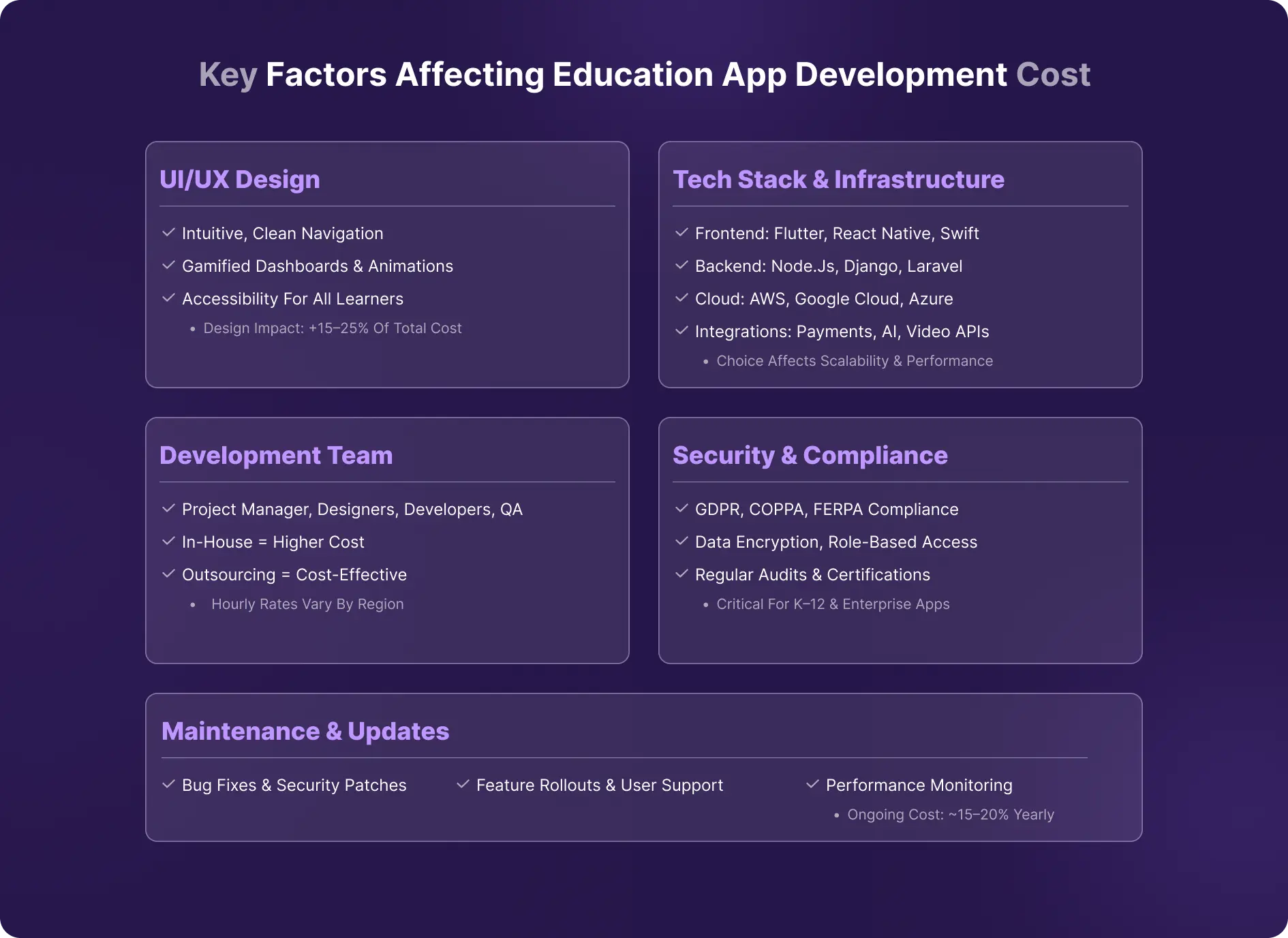
Let’s break down the main factors that influence how much your app will cost.
1. App Features and Complexity
Features are the backbone of any app, and naturally, the more advanced your features, the higher the cost. Education apps can generally be grouped into three levels: basic, advanced, and premium.
- Basic Features: These include registration, course browsing, payment integration, and profile management. A basic app might allow students to sign up, pick a course, make a payment, and track their progress. Development cost of education app for this range from $10,000 to $25,000, depending on other factors.
- Advanced Features: Advanced features include AI-based recommendations, real-time chat, and live streaming. For example, an online coding academy may suggest courses to students based on their previous performance, while a live class allows an instructor to interact with hundreds of learners simultaneously. Naturally, this adds to development time and costs, often pushing budgets into the $50,000–$100,000 range.
- Premium Features: This includes: gamification, AR/VR lessons, adaptive testing, offline access, and highly interactive dashboards. Imagine a language learning app that not only tracks progress but also immerses the learner in a virtual world where they can “practice” speaking in real-life scenarios. Integrating these features requires more sophisticated education application development and testing, often pushing costs above $150,000.
2. UI/UX Design
User experience is everything. Even the best content can fail if the app is confusing or dull. A student should be able to find a course, track progress, and complete lessons with minimal friction.
- Intuitive Interfaces: Clean, well-organized interfaces ensure learners of all ages, from primary students to adult professionals, can navigate easily.
- Custom Animations & Gamified Elements: Features like animated progress bars, badges, and interactive lessons make learning fun, but they increase design time.
- Accessibility Features: Options for visually impaired learners, multilingual support, and readable fonts ensure inclusivity.
3. Tech Stack and Infrastructure
The choice of technology impacts scalability, speed, and long-term maintenance.
- Backend: Options like Node.js, Django, Laravel, or Ruby on Rails form the backbone of the app, managing data, users, and course content.
- Frontend: Flutter, Kotlin, Swift or React Native determine the look, feel, and responsiveness of the app. Cross-platform tools like React Native reduce development cost of education app but may limit some native performance features.
- Cloud Hosting: AWS, Azure, or Google Cloud handle storage, server management, and scalability. Choosing a reliable cloud provider ensures smooth video streaming, real-time updates, and secure data handling.
- Third-Party Integrations: Payment gateways, video conferencing APIs (Zoom, Google Meet), and AI modules simplify development but add integration costs.
4. Development Team Composition
The makeup of your development team directly influences education application development cost:
- Typical Team: Project manager, UI/UX designer, 2–3 developers, QA engineer, DevOps specialist.
- In-House vs. Outsourced: Hiring a local team in North America or Europe is costlier than outsourcing to Asia or Eastern Europe. Hourly rates vary significantly, but experience, communication, and cultural fit also matter.
Additionally, seniority levels play a major role in cost. Senior developers and architects command higher rates but reduce rework and technical debt. A well-balanced team with clear roles, agile processes, and strong domain expertise can significantly optimize timelines, control costs, and ensure long-term maintainability of the education app.
5. Security and Compliance
Education apps handle sensitive data, especially K–12 platforms. Parents and institutions expect robust security:
- Data Privacy: Compliance with GDPR, COPPA (for children), and other regional regulations is mandatory.
- Encryption & Access Control: Secure logins, role-based access, and encrypted payments protect both users and instructors.
- Compliance Testing & Certification: Ensuring the app passes all regulatory checks adds to both development time and cost of developing an educational app.
6. Maintenance and Updates
Building the app is only half the journey. Post-launch maintenance ensures it continues running smoothly:
- Bug Fixes: Even the most thoroughly tested apps encounter unexpected issues.
- Feature Rollouts: Adding new features or improving existing ones keeps users engaged.
- User Support: Handling queries, troubleshooting, and onboarding new users is ongoing work.
Want to control the cost to build education app while building a feature-rich, scalable education app? Partner with DevStory to get expert guidance, smart planning, and a development team that turns your vision into a high-performing, user-friendly platform.
7. Third-Party Integrations & APIs
Key Considerations:
LMS & Content Standards: Integrating SCORM, xAPI, or LTI ensures compatibility with existing learning systems but requires custom mapping and validation.
Video & Live Classes: APIs for video streaming, virtual classrooms, and recordings increase backend load and licensing costs.
Payments & Notifications: Payment gateways, SMS, email, and push notification services add per-use and subscription expenses.
These integrations improve functionality and scalability but increase development time, testing cycles, and long-term operational costs.
8. Offline Access & Data Synchronization
Key Considerations:
Local Storage: Course content, quizzes, and progress tracking must be stored securely on devices for offline use.
Sync Engine: Data must sync accurately once users reconnect, requiring conflict resolution and version control.
Extended QA: Offline features need extensive testing across devices and network conditions.
Offline capabilities enhance accessibility and user experience but significantly raise development complexity and cost.
Feature-Wise Education Application Development Cost Breakdown
When it comes to building an education app, not all features are equal. Some are essential for the app to function, while others make it more engaging or specialized. Understanding how each feature affects cost to make educational app can help you plan your budget better. Let’s break it down.
1. Core Features
Core features are the must-haves. These are what your app needs to work properly and give users a smooth experience.
- Login and Registration: Every app needs users to sign up and log in. Most apps allow registration through email, phone, or social media accounts. This is a standard feature, but it still requires secure backend integration.
- Course Library and Player: Students need to browse courses easily and access the content. This includes video lectures, PDFs, quizzes, and assignments. A stable, easy-to-use course player ensures the content runs smoothly on different devices.
- Progress Tracking and Analytics: Students want to see how they’re doing, and instructors need insights on engagement. Features like dashboards, module completion tracking, and quiz scores help achieve this.
- Payment and Subscription Management: If your app is monetized, you need reliable payment processing. This includes one-time purchases, recurring subscriptions, promo codes, and integration with secure payment gateways.
These features are essential, and for a basic app, they typically form the bulk of the initial education application development cost.
2. Advanced Features
Once the core is in place, advanced features can significantly improve the learning experience and keep users engaged.
- AI-Driven Course Suggestions: Personalized recommendations based on a student’s progress and interests help learners find relevant courses faster.
- Real-Time Chat and Peer Discussions: Interaction is key in online learning. Chat features let students ask questions, participate in discussions, or get help from instructors instantly.
- Gamification: Badges, leaderboards, and rewards make learning more interactive and motivate students to complete courses.
- Multi-Language Support: Offering content in multiple languages broadens your reach, especially for global audiences.
- Push Notifications and Engagement Reminders: Timely reminders about upcoming classes, assignments, or new courses help keep students active in the app.
Advanced features increase both development time and education mobile app development cost, but they can significantly improve retention and user satisfaction.
3. Optional Features
Optional features are not necessary for the app to work but can provide a competitive edge or cater to specific use cases:
- AR/VR-Enabled Lessons: Immersive experiences like virtual labs or interactive 3D lessons add a new dimension to learning but require specialized development.
- Offline Content Access: Allowing students to download lessons and access them offline is convenient but adds storage and syncing complexity.
- Integrated Certification or Assessment Systems: Automatic certificate generation, exams, and assessments improve credibility and add professional value to courses.
- Collaboration Tools and Forums: Discussion forums, group projects, and collaborative tools help students engage with peers and instructors, creating a more interactive learning environment.
“Additional Read- AI in Mobile App Development: What to Expect in 2025”
Monetization Models and Their Impact on education mobile app development cost
When you’re building an education app, figuring out how you’ll make money is just as important as deciding which features to include. Your monetization strategy not only affects revenue but also influences cost to make education apps, because each model has its own technical and design requirements. Let’s look at the most common approaches.
1. Freemium Model
The freemium model offers basic content for free, while premium features are behind a paywall or available through in-app purchases. Many language-learning and skill apps use this model. For example, a student might access the first few lessons of a course for free, but unlock advanced lessons or quizzes with a one-time payment or subscription.
- Impact on Cost: You need to implement payment gateways, feature access management, and tracking systems to differentiate free and paid users. It may also require more analytics to monitor user behavior and conversion rates.
2. Subscription Model
Subscription models provide full access to content for a recurring fee, typically monthly or annually. Platforms like Coursera or Skillshare use this approach. Users pay for access to the entire library of courses or a bundle of premium features.
- Impact on Cost: This requires secure subscription management, recurring billing systems, and possibly account synchronization across devices. Supporting multiple subscription tiers and managing renewals adds complexity and increases both development and maintenance cost to make education apps.
3. Pay-Per-Course Model
Some platforms, like Udemy, charge users on a per-course basis. Users purchase only the courses they want, without ongoing fees.
- Impact on Cost: You need robust e-commerce functionality, course-specific payment tracking, and content access controls. Refund management and transaction reporting are also necessary, which can add to backend development time.
4. Institutional Licensing
B2B licensing targets schools, universities, or corporate clients. In this model, institutions purchase access for multiple users or the entire organization.
- Impact on Cost: You need features like multi-user account management, dashboards for administrators, usage reporting, and bulk licensing capabilities. This increases both backend complexity and the scope of UI/UX design.
5. Ad-Based Revenue
Some apps offer free content and generate revenue through third-party advertisements or sponsored content.
- Impact on Cost: Integrating ad networks, ensuring seamless ad placement without disrupting learning, and monitoring ad performance all require extra development work. You may also need content moderation tools to maintain user experience.
The Development Process and Cost Breakdown by Phase
Developing an education app isn’t just about writing code and uploading it to app stores. It’s a structured process that unfolds in stages, each contributing to the overall cost. Understanding how education mobile app development cost are distributed across these phases can help you plan your budget more accurately and avoid surprises.
1. Pre-Development (10–15% of Total Cost)
Before a single line of code is written, the groundwork is laid. This phase focuses on research, planning, and defining the app’s features.
- Market Research & Competitor Analysis: Understanding your audience, their needs, and what competitors are offering helps you create a product that stands out. For example, if you’re building a language-learning app, analyzing apps like Duolingo or Babbel can reveal gaps to address.
- Requirement Analysis: Clearly documenting what the app should do, which features are essential, and which are optional prevents costly changes later.
- Wireframes & Prototypes: Sketching screens and creating clickable prototypes helps visualize the app flow and gather early feedback. This also includes prioritizing features so development focuses on the most impactful ones first.
Although this stage accounts for just 10–15% of total costs, it sets the foundation for the rest of the project. Skipping it can lead to misaligned expectations, feature creep, and higher costs later.
2. Design & Development (60–70%)
This is where most of the investment goes. The bulk of the time and money is spent on building the app and making it visually appealing and functional.
- UI/UX Design: Designing an intuitive interface that works well on multiple devices and platforms is critical. This includes layouts, color schemes, animations, and accessibility features.
- Frontend & Backend Development: Frontend development ensures the app looks and feels right, while backend development manages data, user accounts, and server-side logic.
- Integration with APIs and Third-Party Tools: Payment gateways, video streaming services, analytics tools, or AI modules are integrated to enhance functionality.
- Internal Testing & Feedback Loops: Developers test features internally, gather feedback, and make iterative improvements to ensure stability and usability before launch.
Because this phase involves coding, integration, and multiple rounds of refinement, it typically consumes the largest portion of the budget, around 60–70%.
3. Testing & Launch (10–15%)
Even after development, the app isn’t ready for users until it passes thorough testing.
- Functional, Performance, and Usability Testing: Testing ensures all features work as intended, the app performs well under load, and users can navigate it easily.
- App Store Optimization & Deployment: Preparing the app for Google Play and Apple App Store involves creating descriptions, screenshots, and meeting platform guidelines. Review cycles may require minor adjustments before approval.
4. Post-Launch Support (10–15%)
Launching the app is just the beginning. Post-launch support keeps it running smoothly and improves the experience over time.
- Maintenance & Updates: Fixing bugs, updating APIs, and ensuring compatibility with new OS versions.
- Scaling Infrastructure: As user numbers grow, servers and databases may need upgrades.
- Continuous Improvement: Adding new features, optimizing existing ones, and responding to user feedback keeps the app relevant.
Ready to bring your education app to life without the guesswork? Partner with DevStory’s expert development team to plan, design, and build a scalable, user-friendly app that fits your budget and vision.

Development Cost Of Education App Optimization Strategies
Building an education app can be expensive, but there are smart ways to manage the cost of developing an educational app without compromising on quality. Let’s look at some practical strategies that help you get the most value for your investment.
1. Start with an MVP
A Minimum Viable Product (MVP) focuses on the core features your app needs to function. Instead of building every feature at once, start small, launch quickly, and gather user feedback. For example, if you’re creating a language-learning app, you might start with basic lessons, progress tracking, and payment integration.
Once you validate that users enjoy the app and the concept works, you can gradually add advanced features like AI-based recommendations or gamified challenges. This approach reduces upfront educational app development costs and helps avoid spending on features that may not resonate with users.
2. Leverage Open-Source Tools and SDKs
Using open-source tools, frameworks, and ready-made software development kits (SDKs) can significantly cut development time and cost. For instance, integrating an existing video player SDK or a payment gateway library is faster and cheaper than building these features from scratch. Many open-source solutions are well-maintained and secure, allowing you to focus your development resources on unique app features.
3. Choose a Cost-Efficient Tech Stack
Choosing the right technology stack for mobile app development is crucial for both cost and scalability. Cross-platform frameworks like Flutter or React Native allow you to build apps for iOS and Android simultaneously, reducing development time and maintenance costs. Backend technologies like Node.js or Django offer scalability while keeping infrastructure costs manageable. Choosing the right stack from the beginning prevents costly rewrites later.
4. Prioritize Must-Have Features
It’s tempting to include every feature imaginable, but this can quickly inflate costs. Identify the features that are essential for the first version of your app, and roll out secondary or advanced features in later updates. This phased approach not only controls costs but also keeps your development timeline realistic.
5. Outsource Strategically
Outsourcing to experienced development hubs, such as India, Eastern Europe, or Southeast Asia, can reduce hourly rates without compromising quality. Many agencies offer dedicated teams with experience in EdTech apps, which helps keep costs predictable while maintaining high standards.
6. Automate Testing and Deployment
Automating QA through testing scripts and setting up CI/CD pipelines ensures faster releases with fewer bugs. This reduces manual effort, shortens development cycles, and lowers long-term maintenance educational app development costs.
Common Mistakes That Increase Education App Costs
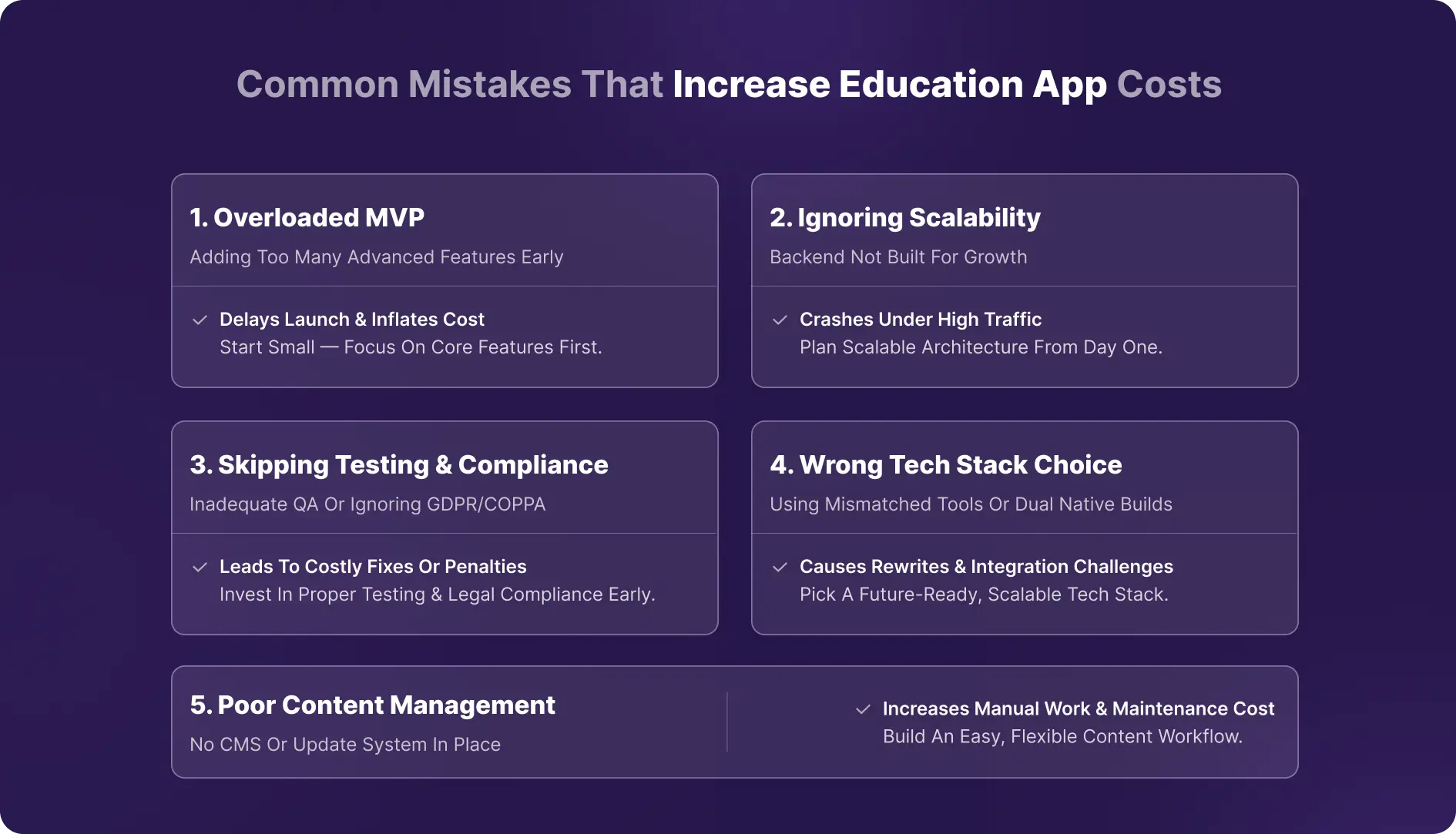
Developing an education app can quickly become expensive if certain pitfalls aren’t avoided. Many businesses focus on speed or feature lists and end up facing unexpected delays and higher costs. Let’s go through some common mistakes that drive up development expenses and how to avoid them.
1. Overloading the MVP with Unnecessary Features
One of the most frequent mistakes is trying to include every feature imaginable in the first version of the app. While it’s tempting to offer AI recommendations, gamification, AR lessons, and offline access all at once, this often results in longer development times and higher costs.
The MVP should focus only on core functionality, registration, course access, progress tracking, and payments. Advanced features can be added later after validating user demand. Overloading the MVP not only increases cost but also delays your launch, reducing your ability to test the market early.
2. Ignoring Scalability in Early Architecture
Some teams build apps that work well for a small number of users but struggle when traffic grows. Ignoring application scalability in the early design phase can lead to costly rewrites or server upgrades later. For example, a tutoring app might perform fine with 1,000 users but crash when thousands of students log in simultaneously.
Planning for scalable backend architecture, cloud hosting, and efficient database management from the beginning saves money and prevents performance issues down the line.
3. Underestimating Testing or Data Compliance Needs
Skipping or minimizing testing to save time is another common mistake. Functional, performance, and usability testing are crucial, especially for apps handling student data. Likewise, education apps often need to comply with regulations like GDPR or COPPA for children.
Underestimating these requirements can result in costly fixes, penalties, or legal issues. Allocating sufficient budget for testing and compliance from the start ensures a smoother launch and avoids expensive surprises.
4. Choosing the Wrong Tech Stack
Selecting a technology stack without considering long-term goals can inflate costs. Using multiple mobile app development frameworks for iOS and Android separately instead of a cross-platform solution, or picking a backend technology that doesn’t support expected traffic, can lead to expensive rewrites.
Choosing the wrong stack may also make it difficult to integrate third-party services or scale efficiently. Evaluating tech options carefully and aligning them with app requirements reduces unnecessary costs.
5. Not Planning for Content Management or Updates
Education apps rely heavily on content, courses, quizzes, videos, and assessments. Failing to plan a proper content management system or update workflow can lead to manual work, errors, and increased maintenance costs. For instance, if instructors can’t easily upload courses or modify content, your team will spend extra hours managing updates. Building a flexible CMS and update process from the beginning ensures ongoing efficiency and lower operational costs.
Conclusion
The cost of developing an education app isn’t a fixed number, it depends on several factors, including the scope, complexity of features, chosen platform, and even the region where development takes place. What matters most is not just minimizing upfront expenses but making smart decisions that ensure long-term value.
Phased execution and careful planning can go a long way in controlling costs. Starting with a well-defined MVP, prioritizing essential features, and scaling gradually allows you to validate ideas and allocate resources effectively. Similarly, choosing the right tech stack, integrating the necessary compliance measures, and planning for ongoing maintenance ensures your app can grow without costly overhauls.
If you’re looking to bring your education app idea to life without compromising on quality or scalability, partner with an experienced education app development company like DevStory. Their expertise can help transform your vision into a smart, user-friendly, and scalable platform that stands out in the competitive EdTech space.


 Enjoy 20% Off All App & Web Services