Understanding UI/UX Design Trends in 2026
Whether it’s a mobile app or a web application, have you ever questioned why some digital experiences feel effortless while others test your patience within moments? The explanation to this is found not in the programming but its UI design trends. In today’s hyper-connected environment, crafting the best mobile app UI/UX design or web UI/UX design has become the silent driver of digital success — something forward-thinking companies like DevStory strategically prioritize to build high-performing, user-centric products.
Now users no longer evaluate the application entirely based on appearance but assess it on the basis of how they make them feel. Ranging from micro-interactions to motion graphics, the current landscape of modern mobile and web app design ultimately determines whether your audience remains engaged, converts, or permanently removes your app.
As we entered 2026, the standards for mobile app ui/ux design have always been higher. Each scroll and swipe done by the user should give clarity, speed, and emotional fulfilment. What distinguishes an app that thrives from one that is forsaken? Effortless usability and intuitive design.
In this guide, we will reveal the top reasons why UI/UX design serves as the foundation for successful modern mobile app design, examine the top UI design trends that are reshaping various industries, address prevalent design challenges, and provide best practices to ensure your app’s long-term success. If you are looking for a guide for business app designs, this article will help you understand how strategic UI/UX decisions directly impact engagement, conversions, and long-term brand growth.
However, here is the surprising fact — 91% of users will not take the time to voice their dissatisfaction with a negative experience; they simply disappear. Just consider the several business opportunities that are lost without notice.
Let us delve further into the consequences of inadequate UX and uncover what today’s users truly expect from brands that aim to maintain their engagement!

The Current State of UI/UX Design in Mobile and Web Apps
Choosing whether to launch a mobile application or a web application is not always a straightforward decision. Numerous factors must be considered prior to making this choice – including user experience, technical limitations, cost-effectiveness, and application scalability.
Creating user interfaces for web and mobile platforms requires a careful balance of functionality, aesthetics, and user experience. Although both strive to provide smooth interactions, their methodologies differ because of variations in hardware, user behavior, and design limitations. Let us examine the distinctions between web design and mobile app design.
The Global web app UI/UX design was valued at USD 49.93 Billion in 2024 and is expected to expand from USD 55.27 Billion in 2025 to USD 124.64 Billion by 2033, achieving a CAGR of 10.7% throughout the forecast period (2026–2033).
The growth of the global web UI/UX design market is fueled by the increasing significance of online presence, the rise of E-commerce, the shift towards mobile-first websites, and a heightened emphasis on UX/UI design. As more businesses transition to online platforms, establishing a strong online presence has become crucial. Companies across various sectors are allocating resources towards high-quality websites, aiming to engage customers, enhance brand visibility, and improve overall business performance.
On the other hand-
The evolution of mobile UI UX design is marked by thrilling trends that are transforming user interactions. Today’s users make an opinion within the blink of an eye- just 50 milliseconds and surprisingly about 94% of the first impressions come down to design.
- Every dollar invested in user experience yields a return of $100, resulting in a return on investment (ROI) of 9,900%.
- Increasing the budget for UX development by 10% can result in an 83% rise in conversion rates.
- Organizations that adopt superior design practices experience growth rates that are double the industry average.
- One in five users spends more than 4.5 hours daily on their mobile devices.
- 39% of users will disengage from content if the loading time is excessive.
- 85% of individuals believe that a company’s mobile website should be as effective or superior to its desktop counterpart.
- 88% of users are less inclined to return following a negative user experience.
- Mobile users are five times more likely to abandon a task if a website is not optimized for mobile use.
Source- uxcam
User behavior analytics and accessibility are essential components of UX strategy. These both modern mobile app design strategies help identify user needs, enhance navigation, and guarantee outstanding, flawless experiences that increase engagement, satisfaction, and retention.
Why UI/UX in Mobile App Designs Matter?
Did you know, nearly 70% of shoppers leave their carts before completing a purchase, according to the Baymard Institute.
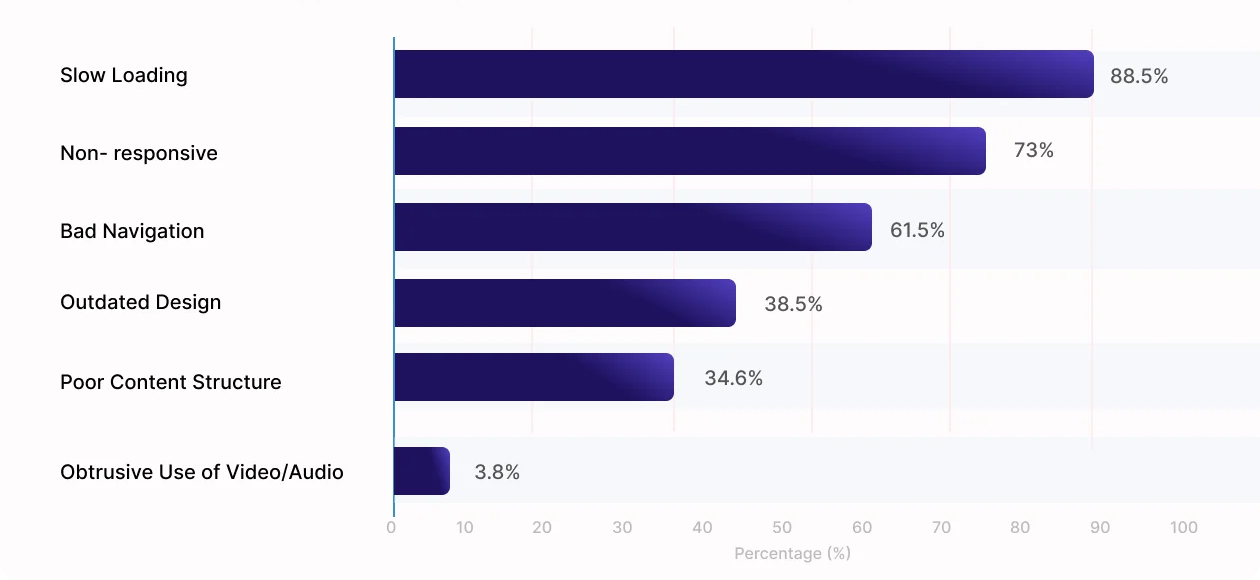
A poor and terrible mobile app ui ux design is not merely a minor design error. This minor flaw can turn into a big liability and can silently affect your business, lose your customer, revenue and long-term success. The cost of neglecting user expectations can be extensive. The implications of ignoring user expectations can be far-reaching and extremely expensive, ranging from a damaged reputation for the company to potential legal issues.
Below are some critical consequences you should be aware of.
1. First Impressions Drive Engagement
Your app’s UI is the very first thing users notice — from button layouts and icons to typography and color schemes. A visually appealing and intuitive interface creates a strong first impression, encouraging users to explore further.
2. Strengthens Brand Identity
Great UI/UX design leads to a seamless experience, which boosts customer satisfaction and loyalty. People tend to trust and stick with apps that are not just functional, but pleasant to use — making them more likely to recommend it to others and return for updates.
3. Makes a Lasting Impression for Startups
For not only startups and small businesses, even for well established apps UI UX can be the first major customer touchpoint. The best mobile app designs can make your app memorable and encourage repeated use — even when your brand is still new in the market.
4. Provides a Competitive Edge
A unique, polished, and user-friendly interface sets your app apart in a crowded market. Combined with smart UX strategies, it ensures a smooth journey — helping your app win over users in both local and global markets.
5. Builds Trust and Credibility
A sleek, intuitive design signals professionalism and reliability — essential when handling sensitive user data. Poor design, on the other hand, can make users wary, especially in sectors like finance or health.
It’s crucial to grasp the fundamentals, but remember – the design world never stands still. As new technologies emerge and user behaviors evolve, the demand for extraordinary mobile experiences continues to transform. The difference between industry leaders and forgotten apps increasingly lies in anticipating these shifts early, not just reacting to them.
This is where strategic design separates fleeting trends from lasting innovations. The most successful apps don’t merely adopt new techniques – they adapt them to serve their unique user needs and business goals. Partner with Dev Story to access top-notch UI/UX design services that intelligently transform these trends into tangible results, ensuring your app doesn’t just follow the market – but leads it.
Why Does Web App UI/UX Design Matter?
In the current browser-centric digital landscape, users anticipate web applications to be quick, intuitive, and smooth. Effective UI/UX design for web apps converts intricate interfaces into streamlined, user-friendly experiences that enhance engagement, foster trust, and increase conversions.
Below are several important reasons you should take into account.
- Performance Perception Directly Affects Retention
Users frequently evaluate the quality of a web application based on its speed and responsiveness. Inefficient layouts, slow interactions, or disorganized interfaces immediately indicate a lack of efficiency, resulting in increased bounce rates and decreased retention.
- Simplifies Complex User Journeys
Contemporary web applications often feature data-intensive dashboards, workflows, and integrations. Careful web UI/UX design alleviates cognitive burden, guiding users effortlessly through intricate tasks without causing frustration or confusion.
- Ensures Consistency Across Browsers and Devices
In contrast to native applications, web applications must operate flawlessly across various browsers, operating systems, and screen sizes. Thoughtfully web app UI/UX design guarantees visual consistency, usability, and stability in all environments.
- Improves Accessibility and Long-Term Scalability
Inclusive UI/UX design enhances accessibility for a wide range of users while ensuring that the interface can grow as features and data increase. This strategy facilitates long-term development without sacrificing clarity or usability.
- Aligns Design With Business Growth
Streamlined navigation, clear calls to action, and intuitive layouts reduce user mistakes and drop-offs. By synchronizing UX strategy with current web app design trends, businesses can enhance conversions, productivity, and overall digital performance.
As web technologies progress, user expectations increase at a similar pace. The most effective platforms do not pursue trends without thought—they implement design strategies that foresee user requirements and align with business goals.
With Dev Story’s UI/UX design expertise, your web application can transcend mere usability to provide scalable, accessible, and conversion-oriented experiences—guaranteeing that your product leads the market rather than trailing behind it.
Top UI/UX Design Trends in 2026
Understanding the importance of UI UX is just the beginning.
As technology and user behavior evolve, so do design expectations. To stay relevant and competitive, app creators must not only grasp the fundamentals but also anticipate what’s next. That’s why keeping an eye on emerging design trends is critical — they shape how users interact, engage, and connect with your product.
Let’s explore the top modern ui ux design trends, set to redefine the user experience in 2026:
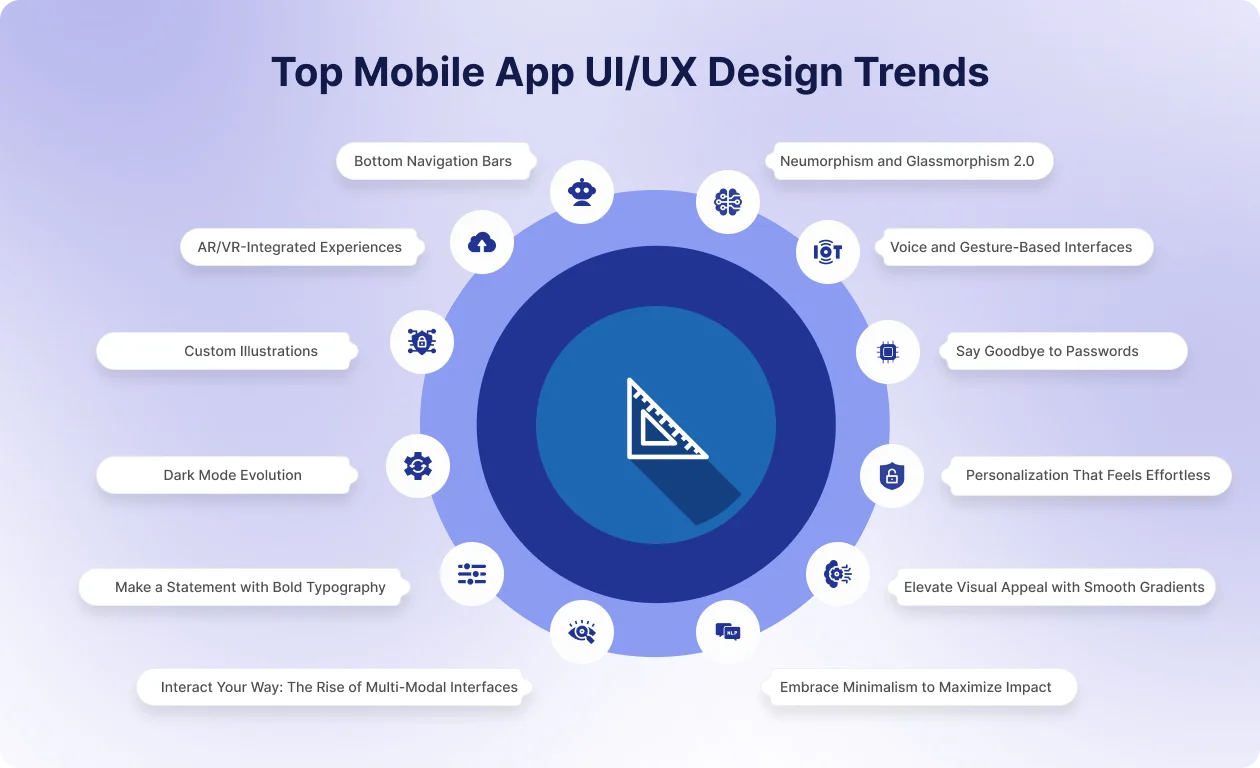
1. Neumorphism and Glassmorphism 2.0
Have you ever observed applications that possess both a tactile quality and a contemporary feel? This is the allure of Neumorphism and Glassmorphism 2.0. It is a design methodology that merges ultra-fine realism with simplistic, resulting in crafting interfaces that are both refined and user-friendly.
These highly advanced design trends are elevating mobile app UI designs to unprecedented heights. Gentle shadows, frosted-glass transparency, and heightened minimalism contribute to an air of sophistication in apps while prioritizing usability. When implemented effectively, these design elements enhance visual hierarchy, boost readability, and offer a modern aesthetic that is both immersive and practical.
Here’s what makes this trend truly effective in mobile app UI designs:
- Softer Shadows & Frosted-Glass Transparency: Develop depth and a tactile experience in application components, providing buttons, cards, and containers with a realistic quality that facilitates user engagement
- Elevated Minimalism for Modern Aesthetics: Emphasize simplicity while preserving sophistication, ensuring that each component serves a purpose and contributes to a streamlined, distraction-free interface.
- Improved Contrast for Better Readability: Implement simple layering, shadows, and transparency to uphold a clear visual hierarchy, making content straightforward to scan.
When implemented with care, Neumorphism and Glassmorphism 2.0 in mobile application user interface designs not only appear visually appealing but also improve user engagement, rendering interactions intuitive, contemporary, and exceptionally pleasurable.
2. Voice and Gesture-Based Interfaces
Envision managing an application without the need to press any buttons — this is the potential of voice and gesture-driven interfaces. The mobile applications design is propelling to emphasize hands-free interactions, thereby enhancing accessibility, efficiency, and user engagement.
These interfaces enable users to navigate applications in a natural manner, integrating voice commands and gestures to provide intuitive and seamless experiences.
When executed properly, they minimize friction, enhance usability, and facilitate multitasking, resulting in a more intelligent and user-friendly digital environment.
Here’s what makes this trend impactful in mobile applications design:
- Hands-Free Interactions for Accessibility and Multitasking: It helps users to engage with applications while simultaneously undertaking other activities or for individuals facing mobility difficulties, thereby promoting inclusivity.
- Gesture Recognition for Intuitive Navigation: Actions such as swipes, pinches, and taps serve as significant shortcuts, facilitating quicker and more engaging navigation.
- Combining Voice + Touch for Hybrid Experiences: The integration of voice commands with conventional touch inputs results in a flexible, adaptive, and highly responsive design for mobile applications that meets the varied preferences of users.
By integrating voice and gesture-based interactions, the mobile applications design evolves to be more intuitive, immersive, and in harmony with users’ preferences for engaging with technology.
3. Dark Mode Evolution
Dark mode has transcended mere visual preference; it has become a fundamental aspect influencing contemporary trends in mobile app design. Adaptive dark and light themes are set to advance, providing not only aesthetic appeal but also enhanced usability, personalization, and energy efficiency.
Advanced mobile applications are utilizing dark mode to alleviate eye strain, prolong battery life on AMOLED displays, and foster immersive, visually pleasant experiences. When implemented with care, it improves accessibility and enables users to customize their app environment according to their preferences.
Here’s what makes dark mode truly transformative in trends in mobile app design:
- Battery Optimization Through AMOLED Dark Palettes: Darker user interfaces utilize less power on OLED and AMOLED screens, thereby improving device efficiency and user satisfaction.
- Enhanced Color Contrast and Accessibility Focus: A careful selection of colors guarantees that content remains clear and legible, promoting accessibility for all users.
- Personalization via Mood-Based Theme Switching: Users have the option to manually switch themes or depend on intelligent systems that adjust to their mood, time of day, or environment, resulting in a more intuitive and user-centric app experience.
By adopting contemporary trends in mobile app design such as the advanced dark mode, applications can merge aesthetics, functionality, and user well-being, resulting in experiences that are visually attractive, effective, and highly customized.
4. Personalization That Feels Effortless
Ever used an app that seemed to “just get you”?
That’s the power of smart personalization — and in 2026, it’s no longer optional. With 80% of users more likely to purchase from brands that offer tailored experiences, mobile apps are leaning heavily on data, machine learning, and user behavior to create interfaces that feel intuitive and engaging.
Take Netflix, for instance — its recommendation engine dynamically reshapes your homepage based on viewing habits, making the app feel like it was built just for you. When done right, personalized UI/UX not only enhances engagement but builds lasting user trust and loyalty.
So, what makes personalization truly effective in mobile app design? Let’s take a closer look at the key features driving this trend forward:
- AI-Powered Recommendations: Deliver custom content, products, or services by analyzing user preferences, interactions, and behavior patterns using real-time machine learning and predictive algorithms.
- Dynamic Home Screens: Automatically adapt layouts, buttons, and featured content based on time of day, user location, and individual usage habits to enhance relevance and usability.
- Behavioral Triggers: Send personalized push notifications, messages, or updates triggered by specific in-app actions, increasing engagement by aligning with real-time user behavior and intent.
- Personalized Onboarding: Offer a customized app setup journey based on user interests, goals, or role, making the experience feel more relevant from the very first interaction.
5. Say Goodbye to Passwords
Still typing passwords to log into apps?
That could soon be a thing of the past.
Password less login methods including fingerprint scans, Face ID, one-time codes, and magic links — are rapidly becoming the new standard. Not only are they more convenient, but they also offer a higher level of security.
Apps like WhatsApp and top banking platforms have already adopted pass wordless logins, using biometrics and secure tokens to keep accounts protected while offering users a seamless and secure login experience.
As this trend continues to grow, let’s explore the key mobile app banking trends that are making pass wordless authentication a game-changer in modern mobile app design:
- Biometric Authentication: Uses fingerprint, face recognition, or voice ID for fast, secure login, removing passwords while enhancing security by confirming the user’s identity with unique physical traits.
- Magic Links via Email or SMS: Sends a time-sensitive login link to users’ registered email or phone, allowing seamless access with a single tap, offering both security and convenience.
- One-Time Passcodes (OTPs): Delivers temporary, one-time-use codes via SMS or an authentication app to verify users, reducing reliance on traditional passwords and offering an extra layer of protection.
- Secure Device Tokens: Registers trusted devices and stores encrypted tokens, ensuring users remain logged in across sessions, while providing secure access without repetitive logins or compromising personal data.
6. Embrace Minimalism to Maximize Impact
Ever opened an app and instantly knew how to use it, without a second thought?
That’s the magic of minimalism.
It strips away the noise so users can focus on what matters most.
By embracing clean layouts, simple navigation, and purposeful content, minimalist app design reduces cognitive load, improves load speeds, and helps users get things done fast.
For instance, when DoorDash redesigned parts of its interface using neutral colors, intuitive icons, and streamlined navigation, it saw a 20% increase in first-order completions—proof that simplicity enhances usability and conversion.
So, let’s explore the key features behind this user-first approach:
- Clean, Clutter-Free Layouts: Focuses on simplicity by reducing unnecessary elements, allowing users to easily navigate and find what they need without distractions.
- Intuitive Icons & Buttons: Uses clear, simple icons and buttons that enhance usability, ensuring users can easily interact with the app without confusion.
- Purposeful Content: Prioritizes essential content that directly meets user needs, minimizing irrelevant information and boosting the overall user experience.
- Fast Load Speeds: Streamlined design and fewer elements contribute to quicker load times, resulting in higher user satisfaction and retention.
7. Make a Statement with Bold Typography
Sometimes, words don’t just tell a story – they shout it.
Bold typography is becoming a staple in mobile and web design, especially on landing pages and microsites. It’s one of the simplest yet most effective ways to instantly grab user attention and guide them through your content.
But bold doesn’t mean random. For impact, typography should be thoughtfully integrated into the overall design – complementing your layout, tone, and brand identity.
Just look at brands like Nike and Dropbox: their use of bold, confident typefaces transforms simple words into compelling statements that guide the user journey.
Let’s break down the key features driving its success:
- Oversized Headlines: Large, eye-catching fonts instantly grab attention and help define visual hierarchy without overwhelming the design.
- Contrasting Font Weights: Combining bold and light fonts adds depth and balance, guiding the reader’s eye while maintaining clarity and flow.
- Brand-Aligned Typefaces: Typography choices reflect brand tone whether energetic, minimalist, or luxury ensuring consistency and personality across the app.
- Responsive Text Scaling: Text adjusts smoothly across device sizes, maintaining readability and impact from mobile phones to tablets.
8. Make It Fun: Add Gamification for Engagement
Ever felt a little rush when you unlock a badge, hit a streak, or see your name on a leaderboard?
That’s the magic of gamification — transforming routine app interactions into fun, rewarding moments that keep users engaged and coming back for more.
By tapping into our natural drive for achievement and recognition, gamification boosts motivation, encourages habit-building, and turns everyday tasks into enjoyable challenges.
Apps like Duolingo have mastered this approach, using streaks, experience points, and playful animations to make learning feel like a game — and it’s helped them build a community of over 60 million active users.
As gamified design becomes more strategic and immersive, here are the key features driving its success in mobile apps.
- Progress Tracking & Streaks: Visual progress bars and daily streaks motivate consistent usage, reinforcing habits through rewarding visuals and milestone achievements.
- Achievements & Badges: Unlockable rewards for completing tasks or reaching goals offer a sense of accomplishment and encourage users to stay engaged.
- Leaderboards & Challenges: Competitive elements like ranking systems and social challenges spark user motivation, especially when integrated with social sharing or communities.
- Reward-Based Interactions: Points, virtual goods, or discounts incentivize actions, making routine tasks feel exciting while boosting user satisfaction and app stickiness.
9. Interact Your Way: The Rise of Multi-Modal Interfaces
Why tap when you can talk, swipe, or even glance?
Mobile apps are evolving beyond traditional touch-based controls, embracing multimodal interfaces that let users interact through voice, gestures, facial recognition, and more — often in combination.
This shift isn’t just about showcasing advanced tech; it’s about meeting users where they are. Whether you’re speaking to your phone while driving, swiping one-handed on a crowded train, or using gestures when your hands are full, multi-modal design creates a more natural and adaptive experience.
Google Assistant is a prime example, allowing users to switch effortlessly between voice commands and screen taps depending on what feels most intuitive at the moment.
Let’s explore the key features that are powering this flexible and user-first approach to mobile interaction:
- Voice Integration: Apps support voice commands for navigation or actions, improving accessibility and hands-free interaction in multitasking or on-the-go scenarios.
- Gesture-Based Controls: Swipe, pinch, and motion gestures enable faster, more intuitive navigation, reducing reliance on buttons and menus for common tasks.
- AI-Powered Context Switching: Interfaces adapt input modes (touch, voice, text) based on environment, behavior, or device usage to maintain seamless experiences across contexts.
- Visual + Voice Sync: Users get visual feedback while using voice commands, enhancing clarity and reducing friction in command execution or error correction.
10. Bring Designs to Life with 3D Graphics & Animations
Ever been wowed by an app that feels alive the moment you open it?
That’s the power of 3D graphics and motion design at work. These elements are transforming static screens into dynamic, immersive experiences that feel both modern and emotionally engaging.
From interactive product previews and animated transitions to playful micro-interactions, 3D design adds depth, realism, and personality to mobile apps. It doesn’t just make things look good — it enhances usability, storytelling, and the emotional connection users feel.
Fashion brand Zara, for instance, leverages 3D product views in its app to let shoppers explore items from every angle, creating a more tactile, confident shopping experience — all without stepping into a store.
Let’s dive into the key features that are bringing mobile interfaces to life through 3D and animation:
- Interactive Product Models: Users can rotate, zoom, and explore products in 3D offering a hands-on experience that boosts confidence and purchase intent.
- Micro-Animations for Feedback: Subtle animations guide users during interactions, such as button taps or screen transitions, making the app feel responsive and polished.
- Real-Time Rendering: Advanced rendering engines deliver lifelike 3D experiences without compromising load times, especially important for product demos and visual storytelling.
- Onboarding with Motion: Animated walkthroughs visually explain features or workflows, reducing cognitive load and helping users learn through action.
11. Elevate Visual Appeal with Smooth Gradients
Flat colors are fading – gradients are making a vibrant comeback.
Smooth, fluid gradients have become a go-to for modern UI design, offering depth, mood, and a touch of elegance without overwhelming the interface. They bring visual interest to backgrounds, buttons, and icons while maintaining a clean and cohesive look.
Major players are leading the way – Apple’s macOS Big Sur, Microsoft’s Fluent Design, and Google’s redesigned app icons all embrace smooth gradients to add dimension and character.
Let’s break down the key features that make gradients a standout design element in 2026:
- Multi-Tone Color Blends: Soft, multi-color gradients add richness to backgrounds, buttons, and cards, creating modern visuals without overwhelming users.
- Directional Lighting Effects: Linear and radial gradients mimic natural light, adding realism and depth to flat designs while maintaining performance efficiency.
- Motion-Enhanced Transitions: Animated gradients bring screens to life during transitions or interactions, increasing user engagement and creating a more dynamic experience.
- Brand-Centric Color Schemes: Gradients are custom-built using brand colors, reinforcing identity while keeping the interface fresh and memorable.
12. Bottom Navigation Bars
Ever used an app where everything just feels within reach – literally?
That’s the beauty of bottom navigation bars. Designed with modern phone sizes in mind, they keep key actions close to your thumb, making the entire experience smoother, faster, and more intuitive
Whether you’re scrolling through your feed, browsing music, or checking messages, bottom nav helps you move effortlessly – no awkward hand stretches required.
Instagram and Spotify are prime examples, using bottom navigation to give users quick access to core functions like Home, Search, Library, and Profile — all within easy reach.
Let’s take a closer look at the key features that make bottom navigation such a game-changer in modern mobile app design:
- Thumb-Friendly Layouts: Positioned for optimal reach on large screens, allowing effortless single-handed use without overstretching or constant device shifting.
- Consistent Iconography: Recognizable icons paired with optional labels improve usability and minimize the learning curve across different app sections.
- Highlight Active State: Visual indicators like color changes or underlines clearly show the selected tab, improving orientation and navigation clarity.
- Adaptive Navigation: Menus adjust based on screen size or usage patterns, ensuring a responsive and personalized navigation experience.
13. Custom Illustrations
Tired of apps that all look the same?
Custom illustrations are a breath of fresh air – infusing personality, warmth, and originality into mobile experiences in ways stock images simply can’t.
They’re more than just decorative elements. Thoughtfully crafted illustrations help convey your brand story, explain complex features, and build emotional connections with users right from the first screen.
Dropbox, for example, uses playful, hand-drawn illustrations throughout its app, giving it a fun, approachable vibe that sets it apart from the competition. This creative approach has not only enhanced its brand identity but has also helped attract a massive user base of over 700 million.
Let’s dive into the key features that make custom illustrations a powerful tool in mobile app design:
- Brand-Driven Style: Tailored illustrations reflect your brand’s tone, values, and personality—making your app more memorable and visually distinct from competitors using generic visuals.
- Emotive Storytelling: Illustrations can simplify complex ideas while evoking emotion, helping users relate to features or actions on a deeper, more intuitive level.
- Seamless Onboarding Visuals: Illustrated guides during onboarding boost engagement and comprehension, especially for first-time users unfamiliar with your app’s functions or layout.
- Lightweight & Scalable Assets: Optimized illustrations load quickly and scale well across different screen sizes without sacrificing quality, ensuring both performance and aesthetics.
14. AR/VR-Integrated Experiences
Augmented Reality (AR) and Virtual Reality (VR) technologies are revolutionizing user interactions with applications, offering immersive experiences that surpass conventional interfaces. In the coming years modern mobile app design will progressively integrate mixed reality to narrate captivating brand stories, facilitate interactive training, and enhance user engagement.
Here’s what makes AR/VR integration impactful:
- Mixed Reality for Immersive Brand Storytelling: By allowing users to explore settings, goods, or services in interactive three dimensions, brand memory and emotional connection are improved.
- AR Product Try-Ons and Navigation Assistance: AR facilitates virtual fitting rooms, interactive maps, and location-based navigation, enhancing convenience and usability.
- Interactive Environments for Higher User Engagement: Gamified and responsive VR/AR environments promote extended interaction, improving engagement metrics and user satisfaction.
Therefore by incorporating AR/VR into modern mobile app design can deliver an experience that is future-oriented, highly engaging and profoundly memorable.
Mobile App VS Web App UI/UX Design Trends
While the UI/UX design of mobile apps is tailored for touch-based, on-the-go interactions with restricted screen space, web UI/UX design emphasizes adaptable interfaces that can scale across various devices and accommodate complex tasks—resulting in design trends for each platform that are specifically aligned with users’ expectations and behaviors.
| Aspect | Mobile App UI/UX Design Trends | Web App UI/UX Design Trends |
|---|
| Primary Interaction | Touch-based interactions such as taps, swipes, gestures, and long presses dominate the overall experience | Mouse, keyboard, and touchpad interactions with hover states and shortcuts shape the user experience. |
| Screen Consideration | Designs are optimized for small screens, focusing on minimal elements and thumb-friendly navigation | Interfaces leverage larger screens, allowing more content, panels, and multi-column layouts. |
| User Context | Users interact briefly and frequently, often while multitasking or on the move. | Users engage for longer sessions, usually with a specific task or workflow in mind. |
| Navigation Style | Navigation is simplified with bottom bars, gestures, and single-focus screens | Navigation supports depth using sidebars, headers, breadcrumbs, and multi-level menus. |
| Content Density | Content is intentionally limited per screen to avoid cognitive overload | Higher content density is common, especially for dashboards, reports, and management tools. |
| Visual Trends | Motion design, micro-interactions, and immersive visuals enhance emotional engagement. | Clean layouts, subtle animations, and clarity-driven visuals improve usability and productivity. |
| Scalability | Designed for focused tasks with controlled feature expansion | Built to scale with growing data, users, and complex business requirements. |
Industry-Wise Impact of UI/UX Design Trends
The advancement of best mobile & web app designs is revolutionizing the way industries interact with their targeted users. Today’s modern ui/ux design trends extend beyond mere visuals, they prioritize building trusts, personalization, and effortless usability, thereby transforming digital engagement in all sectors.
Fintech: Transparent Interfaces & Predictive UX
In fintech, mobile app UI designs ensure smooth interactions, trust, and engagement. Users may become confused by a poorly designed interface, which can result in low trust and high churn rates. Transparent dashboards, intuitive navigation, and predictive user flows make complex financial data easier to interpret. AI-driven personalization helps users make informed decisions, boosting confidence and loyalty.
Healthcare: Accessibility and Emotional Design
Modern healthcare platforms are increasingly shaped by emerging trends in healthcare app experiences that prioritize empathy, accessibility, and user trust.
Today’s patients expect digital health solutions that are not only functional but emotionally reassuring and easy to navigate. From simplified appointment scheduling and real-time health tracking to AI-powered symptom checkers, intuitive design reduces anxiety and builds confidence. Clear typography, accessible color contrast, voice assistance, and multilingual support further ensure inclusivity for users of all ages and abilities.
By aligning with the latest trends in healthcare app design, businesses can create patient-centric experiences that improve engagement, strengthen provider-patient relationships, and drive long-term loyalty.
And Dev Story as a leading healthcare app development company, prioritize exclusive and visually appealing designs in every solution we create. We build highly advanced healthcare apps by integrating voice assistance, readable typography, and calming visuals to like features. Make your digital healthcare more approachable, intelligent with futuristic layouts, arrangements that enhance comfort, and build trust ensuring your healthcare app designs feel personal and reassuring for each patient.
E-commerce: Personalization & Micro Interactions
The rapid evolution of ecommerce development trends is transforming how users interact with digital shopping platforms.
Numerous studies indicate that users are progressively adopting voice user interfaces and favor services or e-commerce platforms that provide chatbot-enabled customer support. Consequently, there has been a swift increase in UX and UI design trends focused on conversational and voice user interfaces (CUI & VUI) in the eCommerce sector.
Give your user smooth animations and responsive layouts with modern mobile app design trends that thrive personalized experiences. Ensure higher conversions and stronger brand recall with the top ecommerce app development company. Integrate AI-powered recommendations, quick checkouts, and engaging micro interactions to make uninterrupted shopping journeys experience.
EdTech: Gamified and Inclusive Experiences
EdTech applications are becoming dynamic ecosystems. While adaptable mobile app UI designs provide accessibility across all devices and learning levels, gamified features like progress monitoring, achievements, and prizes boost motivation.
On-Demand Apps: Adaptive Design and Real-Time Feedback
By giving users a satisfying experience, mobile app UX principles primarily seek to convert users into dedicated customers. Then comes the contemporary mobile & web app UI UX design, which is essential for programs that run on demand. It has a direct effect on user retention, happiness, and company expansion. Mobile app UI/UX design prioritises responsiveness and speed for on-demand services. For users on the go, real-time updates, dynamic layouts, and adaptable interfaces provide immediate, fulfilling experiences. speed and fashion rule supremely
Taken together, these industries demonstrate how digital innovation is shaped by future-focused mobile app UI UX design, transforming engagement into long-term brand value and utility into enjoyment.
Common Mistakes to Avoid While Implementing UI UX Design Trends
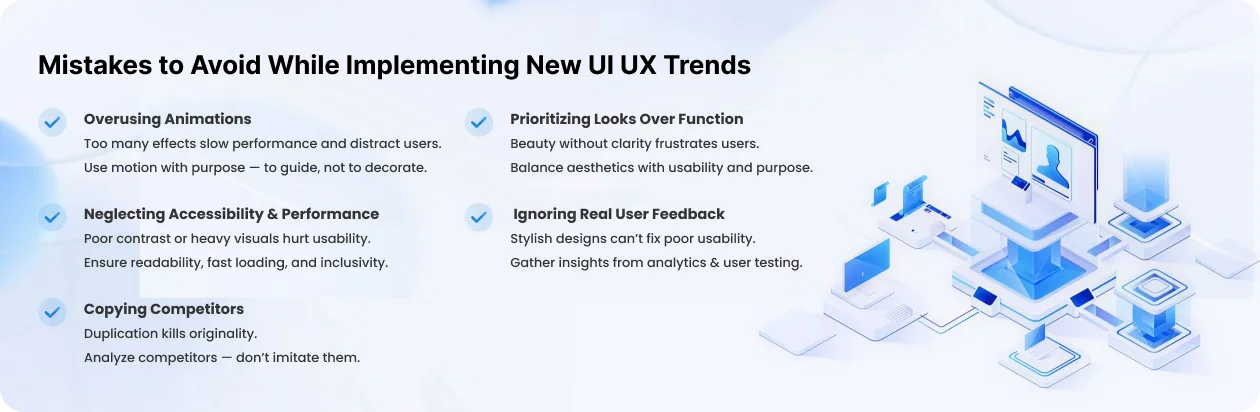
Adopting new mobile app UI UX design trends can give your app a contemporary, forward-thinking appearance, but implementing them without a plan frequently produces subpar outcomes. The actual pillars of excellent mobile app user interface designs are usability, accessibility, and performance, which are often overlooked by brands in their pursuit of aesthetics.
Overusing Animation or Visual Effects
While too many animations might slow down performance and distract users, they can increase interest. Every movement in your mobile app’s user experience design should have a distinct function, such as directing user engagement or offering visual cues, rather than merely being ornamental.
Neglecting Accessibility or Performance
If users are unable to access a visually attractive app, its impact is decreased. Important audiences may be left out if colour contrast, readable text, or assistive compatibility are neglected. Additionally, complex animations or images might slow down loads, which is bad for SEO and user experience.
Copying Competitors’ Design Systems
It may seem safe to copy competitors’ styles, yet doing so destroys originality. Every brand has different users and objectives, and your mobile app’s UI/UX design should represent that. Analysis of competitors should spur advancement rather than duplication.
Ignoring Real User Feedback
Usability issues cannot be resolved by fashionable visuals. Your mobile app UI designs can be improved to better meet the demands of actual users by obtaining insights through analytics, polls, and usability testing.
Prioritizing Aesthetics Over Functionality
Stylish designs mean absence of clarity and ease of use. The best mobile app UX design strikes a balance between functionality and aesthetics to make sure people grasp every action with ease.
Ultimately, the trends you implicate should improve usability rather than overshadow it. Best mobile app designs thrive when compassion, versatility, and purpose guide every creative choice.
Expert Predictions: The Future of Modern App UI UX Design
The future of mobile app design trends are anticipated to be more smarter, adaptive, and profoundly centered around the user. Professionals anticipated that UI UX design trends will grow beyond aesthetics to foresee user needs, emotions, and behaviour, thereby crafting experiences that are seamless, personalized, and nearly imperceptible.
Emergence of Emotionally Intelligent UIs
Applications will progressively interpret user behavior and emotional states, adjusting interfaces in real-time. Trends in emotionally intelligent UI UX design will leverage color, typography, microinteractions, and feedback to react to user emotions, thereby enhancing engagement and fostering loyalty.
Contextual UX Enhanced by AI and IoT
The incorporation of AI and IoT in app will enable it to deliver unique context-aware experiences. This includes suggestions that are based on location and predictive content, with mobile app design trends aimed at proactively assisting users, thereby minimizing friction and improving satisfaction across various sectors
Zero Interface Experiences
The next trend encompasses interfaces that need lesser visual engagement. Voice commands, brain-computer interfaces, and augmented reality lenses will render app design trends more intuitive, facilitating seamless user interaction without the need for conventional screens.
UX Integrating with Brand Storytelling and Sustainability
The brand’s values will eventually be reflected in the design, which will deliver compelling stories and promote ethical and sustainable business practices. Users will engage with programs for meaningful experiences and purpose-driven storylines in addition to their utility.
Continuous Adaptation — “Design That Evolves with Users”
Future applications will continuously learn from user interactions. Adaptive UI UX design trends will develop over time, providing seamless, customised experiences that expand with the user.
All things considered, the future of UI UX design trends will combine creativity, understanding, and flexibility to produce experiences that are not just effective but also highly personalised and emotionally impactful, establishing new standards for user involvement.
Key Takeaways on UI/UX Design Trends in 2026
In today’s digital world where one tap, swipe and scroll defines users perception the best mobile app designs have positioned itself as a secret weapon for business growth. The apps that surpass won’t just look beautiful, but anticipate users’ needs, streamline complicated tasks, and give a unique experience that feels effortless.
Henceforth by mastering these above mentioned modern mobile app design, advanced styles, demand planning, strategies, deep understanding and choosing the best mobile app development company that truly drives engagements.
So, here DevStory comes into picture. As a top mobile app design and development agency, we create amazing mobile products that not only look stunning but also outperform flawlessly and bring real results.
If you are thinking of building a brand-new app from scratch or want to redesign or reimagining the existing one, get in touch with us. Our Chief Design Officer & top UI/UX professionals leverage the latest UI UX design trends and work to enhance customer experience, increase retention, drive success and turn your vision into a high-performing, user-centric reality.
Are you ready to revolutionize your mobile experience? Partner with DevStory today, and let’s create something extraordinary
Don’t lose users — or revenue — to bad design. Get in touch with an award-winning UI/UX Design Company and create an app users can’t quit!
Speak to Our Design Architects Today!


 Enjoy 20% Off All App & Web Services